


Thumbnail Maker - Channel Art
4.81.66K Reviews
App Specs
- Version
- 1.12.2
- Updated On
- License
- Free
- Downloads
- 5,000,000+
- Developer
- Maxlabs Graphic Design Tools
- Categories
- Art & Design
- Platform
- Android
Screenshots

 Analysis by AppCompare
When I need a thumbnail quickly, I care less about having every design tool imaginable and more about getting a clear, readable image without wrestling with a complicated workflow. Thumbnail Maker - Channel Art is aimed at that practical job: making artwork for videos and social profiles on a phone. It sits in the art and design category, and its appeal is straightforward—helping people who are not trained designers put together a finished-looking graphic. I’d treat it as a convenient starting point, rather than a replacement for every kind of design software.
Quick work, with a little planning
The app is free to download, and its current version is 1.10.8. It was released on September 27, 2019, and runs on Android 6.0 or later. The developer is Maxlabs Graphic Design Tools. Those details make it easy to judge whether it fits an older Android device, but they don’t tell me how quickly every project will render on every phone. In everyday use, I’d expect a simple design to be a lighter task than a crowded composition with many visual elements; it’s sensible to leave a moment for the app to finish before switching away or sharing.
That distinction matters when you’re working against a deadline. If I’m preparing one thumbnail for a video that’s ready to publish, I’d choose a template, replace its main image and wording, then check the result at a small size before exporting. That last check is useful because a title that looks generous on a phone’s editing canvas can become hard to read when it appears beside other videos. I would not assume that adding more stickers or decorative text makes the design stronger; a clear subject and a short title usually have more impact.
Where busy designs can slow the process
Simple projects are the app’s natural territory. A creator making a consistent run of episode covers, a small business announcing a weekly offer, or a club preparing a one-off event graphic can benefit from starting with a ready-made layout and changing only what is necessary. Reusing a visual approach also helps an audience recognize related posts. I’d keep a small set of colors and a repeatable title style, then vary the image and wording rather than rebuilding the whole composition every time.
More involved artwork asks for patience and judgement. A background, several stickers, multiple text blocks, and overlapping images can make editing feel less direct, even when arranging layers is available. On a smaller screen, it can also be harder to select the exact object you intend. My practical tip is to make the main image and headline work first, then add supporting details one at a time. If an element does not improve clarity, remove it. This keeps the composition easier to edit and avoids spending time polishing decoration that viewers may barely notice.
There is also a trade-off between a template’s speed and a distinctive look. A template is useful when I need a reliable layout quickly, but leaving its structure untouched may make several creators’ graphics feel alike. I’d use the starting design as scaffolding: change the focal image, simplify the wording, and adjust the colors to suit the channel. That takes less effort than beginning from a blank canvas while giving the result a more personal feel.
Reliability and finishing a project
For a time-sensitive graphic, saving the project and returning to it later is valuable because it lets me separate drafting from final checks. I’d save before making a major round of changes, especially if I’m experimenting with several layers or text treatments. A sensible routine is to finish the layout, pause to inspect the image, and then use the available sharing options only after I’m happy with the final version. This gives me a chance to catch a spelling error or an awkward crop before the artwork goes public.
Worth Reading Before You Choose

EA SPORTS FC Mobile 26 Is a Bigger Football Game, but It Takes Time

Flipboard Shows What News Apps Must Do Beyond the Feed

Switching to Android Auto Means Rethinking Your Driving Routine

Google Calendar Makes a Crowded Week Easier to Manage

Ludo King Makes the Most of the Minutes Between Plans

Baby Panda World Brings Quick Play to Modern Phones, but Its Game Library Feels Busy
The app has a 4.8 average from around 48 thousand ratings, and it has over a million installs. That suggests it has found an audience among people looking for accessible thumbnail-making tools, though popularity alone can’t guarantee that every workflow will suit me. It is rated for Everyone. In-app purchases range from $4.99 to $39.99 per item, so I’d start with the free experience and consider spending only if a particular paid option clearly solves a problem I have. The practical question is not whether extra items exist, but whether they improve the designs I actually need to make.
Device fit and choosing the right tool
On a phone, the biggest constraint is often the working area rather than raw capability. A small display makes fine alignment and detailed edits less comfortable than they are on a tablet or computer. If I’m making a quick social graphic, that compromise is acceptable; if I’m building a precise brand system or artwork that needs careful control of every detail, I’d rather use a larger-screen design program. This app makes most sense when convenience matters more than exhaustive control.
Compared with opening a general-purpose editor and building everything from scratch, a thumbnail-focused app can shorten the route from idea to a usable layout. A full desktop graphics program is a better fit for complex illustration, exact brand specifications, or work that needs a deeply controlled production process. At the other end, a basic collage or text-on-photo editor may be enough for a single announcement, but it may not offer the same thumbnail-oriented starting point. I’d choose based on the job: quick promotional art here, detailed design work elsewhere.
If I were preparing a weekly video series, I’d make one cover that establishes the visual pattern, then use it as a guide for later episodes. I’d keep the title short, place the most important subject where it remains easy to see, and resist shrinking extra information into the corners. For a café posting a weekend special, the same approach applies: one appetizing image, the offer in plain language, and only the details a customer needs. These are modest tasks, but they show where a mobile template workflow can save time without pretending to replace a designer.
Getting Started with Thumbnail Maker
First things first, downloading Thumbnail Maker - Channel Art is a breeze. Available on both Android and iOS, you can snag it from the respective app stores. Once installed, the app welcomes you with a clean and intuitive interface, making it super user-friendly—even for those who might not be graphic design wizards.
Diving into the Features
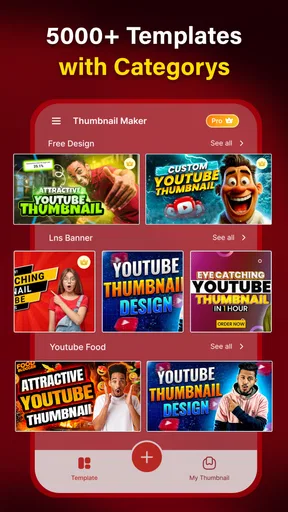
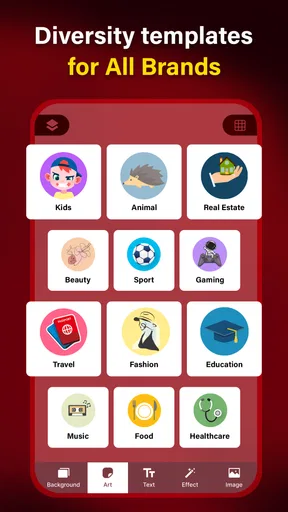
Now, let's chat about what this app can do. It’s packed with a ton of features that make creating professional-looking thumbnails and channel art a walk in the park. You’re greeted with a plethora of templates designed for various platforms, not just YouTube. This means whether you’re revamping your Facebook page or sprucing up your Instagram highlights, this app has got you covered.
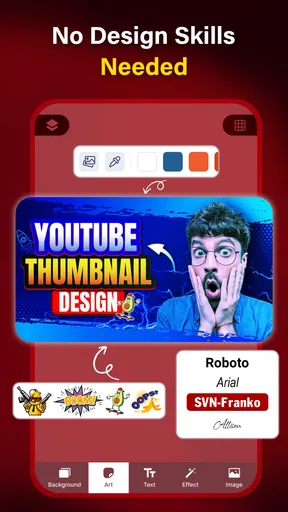
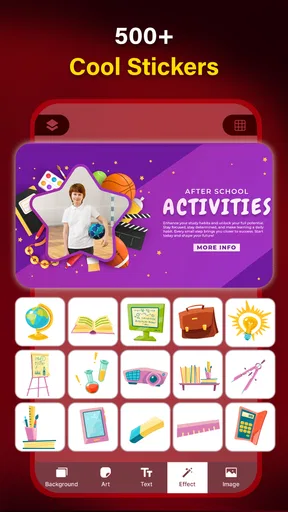
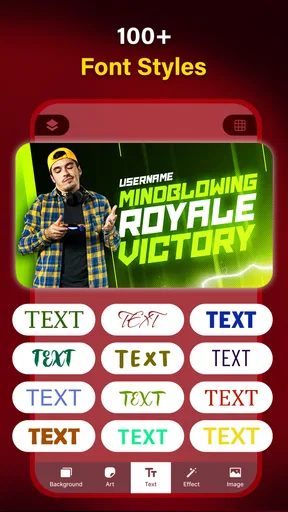
One thing I absolutely love is the drag-and-drop functionality. It’s incredibly smooth, allowing you to easily move elements around without any hassle. The app also boasts a wide array of fonts and stickers, giving you the creative freedom to express your brand’s personality precisely how you envision it.
Customization and Flexibility
Customization is where Thumbnail Maker truly shines. You can adjust almost every aspect of your design: colors, fonts, images, and more. The app even allows for layer management, a feature often reserved for more advanced desktop software. This means you can stack and arrange elements to your liking, creating depth and dimension in your designs.
If you're like me and enjoy keeping things fresh, you'll appreciate the frequent updates that roll out new templates and design elements. It seems like the developers are always on their toes, making sure we have the latest and greatest tools at our disposal.
Performance and Usability
Let’s talk about performance. On both Android and iOS, the app runs smoothly without any noticeable lags or crashes. It's lightweight, so it doesn’t hog your device’s resources, which is a blessing when you’re juggling between multiple apps. Plus, the ability to save your projects and come back to them later is a lifesaver for busy creators.
The app also integrates sharing options directly to social media platforms, which means you can immediately show off your creations with just a few taps. This feature is a huge time-saver for anyone looking to streamline their workflow.
Final Thoughts
So, after spending some quality time with Thumbnail Maker - Channel Art, do I think it’s worth the download? Absolutely. Whether you're a seasoned content creator or just starting out, this app provides all the tools you need to make your channel art stand out. Its combination of ease of use, robust features, and regular updates makes it a solid choice for anyone serious about their online presence.
If you’re ready to take your channel to the next level, give this app a whirl. Who knows, your next viral video might just be one eye-catching thumbnail away!
Pros
- User-friendly interface for quick designs.
- Wide range of customizable templates.
- High-quality export options available.
- Supports multiple social media platforms.
- Regular updates with new features.
Cons
- Limited advanced editing tools.
- Ads can be intrusive during use.
- Some features require a subscription.
- Occasional slow performance on older devices.
- No option for team collaboration.
FAQs for Thumbnail Maker - Channel Art
What features does Thumbnail Maker - Channel Art offer for content creators?
Thumbnail Maker - Channel Art provides a comprehensive suite of tools designed for creating eye-catching thumbnails and channel art. Users can access a variety of templates, fonts, stickers, and backgrounds. The app also offers customization options such as color adjustments and text effects, making it easy for users to tailor their designs to their unique style.
Is Thumbnail Maker - Channel Art user-friendly for beginners?
Yes, Thumbnail Maker - Channel Art is designed with beginners in mind. The interface is intuitive and easy to navigate, allowing users to create professional-quality thumbnails with minimal effort. The app includes step-by-step guides and tutorials, making it accessible even for those with no prior design experience.
Can I use Thumbnail Maker - Channel Art on both Android and iOS devices?
Thumbnail Maker - Channel Art is available for both Android and iOS platforms, ensuring compatibility with a wide range of devices. The app is optimized for smooth performance, regardless of the operating system, so users can enjoy a seamless experience whether on a smartphone or tablet.
Does Thumbnail Maker - Channel Art include options for exporting designs?
Yes, once you've finished your design, Thumbnail Maker - Channel Art allows you to export your work in high resolution. This ensures that your thumbnails and channel art look crisp and professional across all platforms. Users can easily save their designs to their device or share them directly to social media channels.
Are there any in-app purchases or premium features in Thumbnail Maker - Channel Art?
While Thumbnail Maker - Channel Art offers a variety of free features, there are premium options available through in-app purchases. These may include additional templates, advanced editing tools, and exclusive design elements. Users can choose to upgrade for a more extensive design toolkit, enhancing their creative capabilities.


